Make AI-drafted copy sound like a person wrote it.
For anyone who drafts with AI and publishes under their own name: posts, blogs, newsletters, articles, reports, book chapters, proposals, scripts, web copy.
PlainSpeak finds the phrases readers now spot as machine-made, then rewrites them in plain words. Your facts and your voice stay put.
Also for Mac · macOS 13 or later
Also for Windows · Windows 10 or 11
Rewriting uses your own AI key. You get it from a provider such as OpenRouter, which needs an account of its own. Setup takes a few minutes, and $5 of credit covers about 10,000 rewrites of a 100 word draft like this one.
Every feature free for 7 days. No PlainSpeak account, no card. The scan works with no AI key at all, and your text goes only to the AI provider you choose: what is sent, and where.
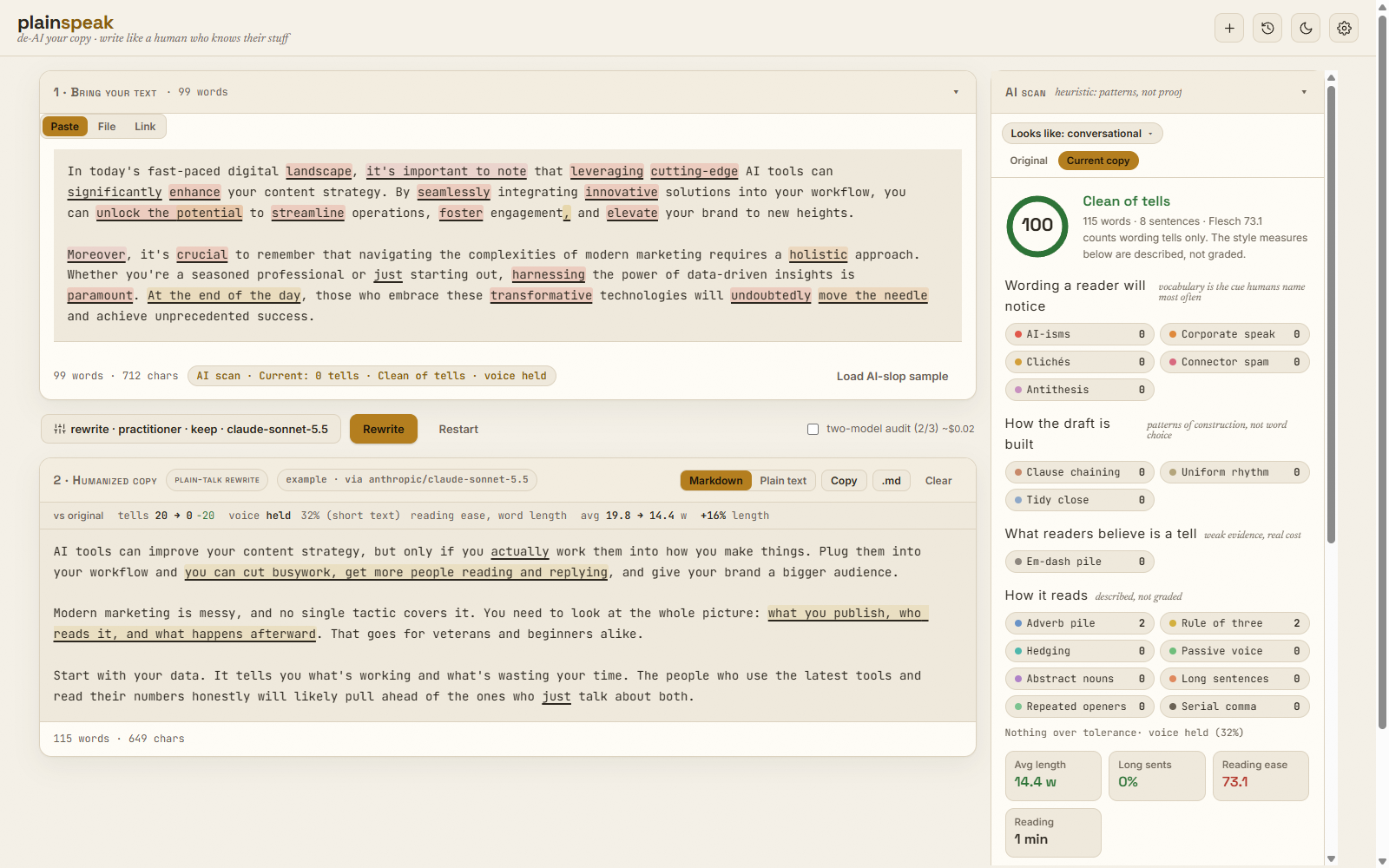
Select either score to scan that text. Scores are out of 100: 100 means the scan found nothing a reader would notice.
Try the scan on this draft
What the colours mean
The scan reads wording: the stock phrases, the business-speak and the rhythms that make readers stop trusting a piece. It also notes passive voice, hedging, long sentences and abstract nouns, but never scores them. A contract, a paper and a social post are all correct, and all different.
- AI-sounding
- crucial, seamlessly, unlock the potential
- Corporate speak
- synergy, leverage, move the needle, circle back
- Clichés
- at the end of the day, tip of the iceberg
- Connector spam
- moreover, furthermore, in conclusion
- Antithesis
- it’s not just X, it’s Y
- Tidy closes
- a last paragraph that sums up what you just said
Edit it, or paste your own. The scan runs in your browser and sends nothing anywhere.
That rewrite took one click in PlainSpeak.
Download free for WindowsWhy not ask your LLM to fix it?
Ask your AI to humanise its own writing and it will say yes, then tell you the result sounds natural. It cannot see the habits it wrote in.
I built PlainSpeak because I was sick of my own AI drafts, and getting the model to humanise its own writing was like asking it to mark its own homework.
- It finds what readers spot as AI. The scan marks the phrases and patterns readers now take as machine-made, in your draft and again in the rewrite. It is the same scan as the demo above.
- Other models can check the result. With an OpenRouter key, the audit hands the rewrite to two models from other makers, never the one that wrote it, and they quote anything that still sounds generated.
- Facts are checked, not assumed. Every figure, date, price and link in your draft, and every quotation of three or more words, is checked against the rewrite, and you are told if any was dropped or changed. Whether the meaning survived is a different question, and the result says it was not checked.
- It tells you exactly what is wrong, and why. Each finding is marked where it sits, with the reason, so you can fix it by hand or have PlainSpeak fix only those phrases.
- Switch models per rewrite, pennies to run. Pick the model in the recipe beside Rewrite; one OpenRouter key reaches every major model. You pay your provider for what you use, about a cent a rewrite, with no stack of subscriptions.
Every figure is published. How the scan was built, what it was tested on, the sample sizes, and where it falls short: how we measure. The scan is not a detector, and makes no claim about what any detector would say.
How it works
-
Scan, always free
Paste a draft, open a Word or text file, or fetch a link. Every tell is highlighted, and a score shows how heavy the draft is.
-
Rewrite, free for 7 days
The AI model you choose rewrites it, told to drop the tells and keep the meaning, the facts and your voice. The result is scanned again, and if a model makes it worse, you keep your original.
-
Check
Numbers, dates, names, links and quotations are checked against your original, so a rewrite cannot quietly drop a figure or add one.
-
Audit
With an OpenRouter key, two models from other makers re-read the result and quote anything that still reads generated. Untick any phrase you want to keep, and one click rewrites the rest.
Choose how much changes
Rewriting is not one setting hidden under the bonnet. You choose the mode, the voice and the length, and the result follows them. Here is one draft three ways, one pass each by the default model, shown as it came.
Each figure is how much of the draft's wording that result kept. Every one kept the draft's number and its quotation.
Rewrite · Practitioner voice · Keep length
- Voices: four built in, Practitioner, Warm, Direct and Mass audience, or write your own. Rewrite puts the piece in the one you choose.
- Templates: give a Repurpose a shape for a post, with its sections, voice, hook and call to action set.
- Your writing: add pieces you wrote yourself, and the scan compares drafts with how you write.
Your text stays yours
- No account to make, and no analytics in the app.
- Your text goes only to the AI provider you choose, with your own key.
- Your key, your settings and your history stay on your computer.
- Your licence is checked on your computer, with no sign-in.
Exactly what PlainSpeak sends, and where. Bringing your own endpoint? Notes for builders.
Pricing
$59 once, no subscription
Before you buy, you get 7 days of all of it. The clock starts when you press Start in the app, not when you install it, so a day spent setting up your key is not one of the seven. Afterwards the scan, its highlights and editing by hand stay free for good.
Payment is handled by Polar, who look after tax and receipts. Your licence key appears straight after checkout, and your receipt email holds a purchase code that brings it back if you lose it.
What the licence covers
- Rewriting, fact checks and source checks.
- Every update released in the next 12 months.
- Keeps working after that, on the versions you have.
- Windows and Mac. One licence works on both.
- For one person, on up to 3 of their own computers.
- For writing in English. The scan does not read other languages yet.
Questions
Is there a free trial?
Yes. For 7 days you get rewriting, both fix passes, the audit, fact checks and source checks, with no account and no card. The clock starts when you press Start the trial in the app, so the day you spend getting an AI key is not one of them. When the week is up, the scan, its highlights and editing by hand stay free for good, and a licence turns the rest back on.
Do I need an AI key?
To rewrite, yes, and that includes the free trial. PlainSpeak sends your text to the provider you choose, with your own key, so your provider still bills for what you run during the 7 days. Scanning works without a key. OpenRouter is the simplest route: one account and one key give you every major model, and most rewrites cost a few cents or less.
Does it work in other languages?
Not yet: PlainSpeak is built for English. The scan's phrase lists and its reading ease formula are English, so a French or German draft full of stock phrases can still score a clean 100. A rewrite keeps the language you give it, but the scan cannot tell you whether it helped, or catch a rewrite that made things worse. Try the free scan on your own writing before you buy.
Is this an AI detector?
No. PlainSpeak is a finishing tool. It counts the wording tells it can name and measures how far a rewrite moved from the way you write. It makes no claim about what any detector would say about your text.
Will it change what I said?
It is told to keep every claim, number and quotation, and it checks: the facts check compares them against your original, and a rewrite that reads more generated than your draft is thrown away so you keep your own text.
I lost my licence key.
Paste the purchase code from your Polar receipt email into PlainSpeak, in Settings, then Account, then Licence key. The code is also in your purchases on Polar, where you sign in with the email you bought with.
What happens after the 12 months of updates?
PlainSpeak keeps working on the versions you have. Versions released after that need a new licence.
What does it run on?
Windows 10 and 11, and Macs with macOS 13 Ventura or later, Apple silicon or Intel: download for Windows or for Mac. There is no phone or tablet version.
Does it work with Word and Google Docs?
Yes. Open a Word file and its headings, bold, italics, lists and links come in with it. When you are done, Copy pastes the rewrite formatted into Google Docs, Word or an email, and Download .docx saves a Word file for your manuscript. In a wide window, Side by side puts your original beside the rewrite, and the two scroll together paragraph by paragraph.
How many computers can I use it on?
A licence is for one person, on up to 3 of their own computers: a desktop and a laptop, say, Windows or Mac or both. The same key works on all of them. Each person who uses PlainSpeak needs a licence of their own.
Anything else: [email protected]