Your download has started
The installer is on its way to your Downloads folder. Three steps and a few minutes from now, you can rewrite your first draft.
If it didn't start, download it here.
Need it for a Mac instead? Get the Mac version.
Need it for a Windows PC instead? Get the Windows version.
Download PlainSpeak on your computer
PlainSpeak runs on Windows and Mac computers, not on phones or tablets. Copy the link, open it on your computer, and the download starts there.
On a computer after all? Download it for Windows or for Mac.
-
Run the installer
Open the file named PlainSpeak-Setup from your Downloads. If Windows shows Windows protected your PC, select More info, check that the publisher is The KAM Coach Ltd, then select Run anyway.
Windows shows that warning for software from a publisher it has seen few downloads from so far. The installer is signed by The KAM Coach Ltd. If the publisher shows anything else, do not run it, and email us.
-
Drag it into Applications
Open the PlainSpeak file that ends in .dmg from your Downloads. A window opens with the PlainSpeak icon, an arrow and an Applications folder: drag the PlainSpeak icon onto that folder. Drag the icon in the window, not the .dmg file itself. Then open PlainSpeak from your Applications folder. The first time, your Mac asks whether you want to open an app downloaded from the internet: select Open.
PlainSpeak for Mac is signed by The KAM Coach Ltd and checked by Apple. If your Mac says it cannot check PlainSpeak for malicious software, do not open it, and email us.
-
Get an OpenRouter key
PlainSpeak rewrites with your own AI key, so the AI provider needs an account of its own. Sign up at OpenRouter, then create a key at openrouter.ai/keys and give it a spending limit.
OpenRouter is pay as you go. $5 of credit covers about 10,000 rewrites of a 100 word draft with PlainSpeak's default model. The scan needs no key at all.
-
Paste it in Settings and start the trial
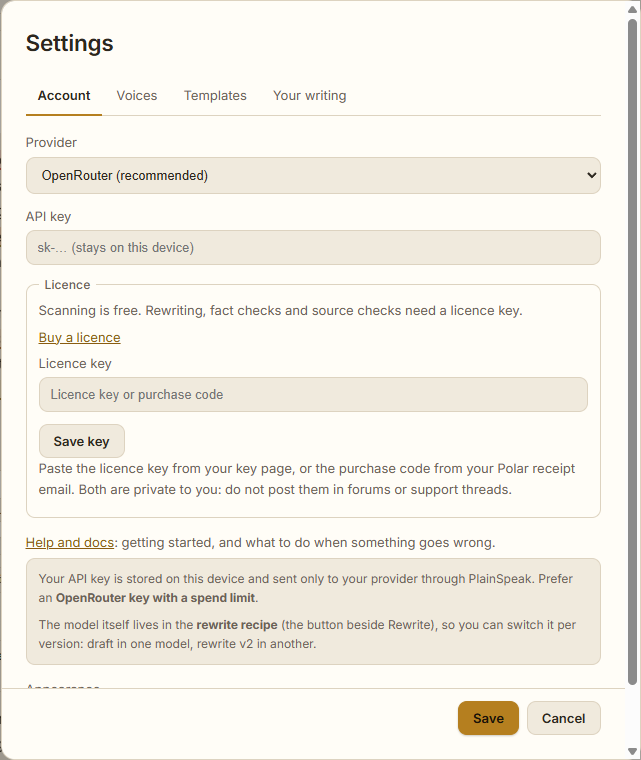
In PlainSpeak, select Settings, the gear at the top right. On the Account tab, choose OpenRouter, paste your key into API key and select Save. Then press Rewrite and select Start the trial. Your 7 free days begin then, not before.
Every step, with pictures: the Get started guide. Older versions and release notes are on the releases page.